When you apply for a mortgage or loan, lenders typically request both the SA302 and the Annual Tax Overview as part of their assessment process.
13/05/2025By Pauzible Team · Editorial Team
The SA302 tax calculation and Annual Tax Overview provide a comprehensive overview of your income and tax liabilities and also serve as vital evidence when applying for mortgages or loans, ensuring that your financial affairs are well-documented and transparent. This article provides an understanding of these documents and their importance.
For each of the tax years to which it relates, it sets out:
your pre-tax income from all sources, including rental income, employment earnings, dividend income, interest income and so on;
your personal tax allowance;
your total income on which tax is due; and
calculation of your income tax, including income tax due after allowances and reliefs, any pay as you earn tax already deducted and any residual tax owing or tax overpayment.
Why is the SA302 Important for Buy-to-Let Landlords?
For buy-to-let landlords, the SA302 is a vital document that serves multiple purposes. One of its primary uses is during mortgage applications, as lenders often require reliable proof of income to assess your ability to repay loans. Unlike traditional employees who can provide payslips, landlords and self-employed individuals rely on the SA302 to demonstrate their earnings. This makes the SA302 widely accepted and trusted by financial institutions.
Beyond mortgage applications, the SA302 is also valuable for financial planning. It provides a clear and concise overview of your total income and tax liabilities, enabling you to budget effectively and ensure that you have set aside enough funds to meet your tax obligations.
By offering both clarity and credibility, the SA302 is an indispensable tool for managing your finances, including as a buy-to-let landlord.
Understanding the Annual Tax Overview
The Annual Tax Overview is available for any year. It provides a clear overview of the tax you have paid to HMRC during a specific tax year. While the SA302 outlines your income streams, tax allowances and how your tax liability has been calculated, the Annual Tax Overview focuses on verifying the amounts you have actually paid or still owe or are owed by HMRC.
For buy-to-let landlords, the Annual Tax Overview provides further transparency by confirming that all required tax payments, including those on rental income, have been paid. This document is especially important when applying for mortgages or loans, as many lenders require not only proof of income (via the SA302) but also confirmation that your tax obligations have been fully met.
The Importance of Both Documents
When applying for a mortgage or loan, lenders typically request both the SA302 and the Annual Tax Overview as part of their assessment process. Together, these documents provide a complete view of your income and taxes. Lenders use this information to assess your ability and reliability to meet repayment obligations, which is especially important in the context of large financial commitments such as mortgages. Having both documents readily available not only speeds up the approval process but also reduces the chances of additional queries and delays.
How to Obtain Your SA302 Tax Calculation and Annual Tax Overview
You can print your own tax calculation and tax year overview if you do your Self Assessment tax return using either of the following:
When you click on the link immediately above, you will be taken to a webpage which includes a link to a document called “Mortgage providers and lenders who accept a SA302 tax calculation and a tax year overview”. This document contains an alphabetical list of the relevant mortgage providers and lenders.
You cannot print your documents until 72 hours after you sent your tax return.
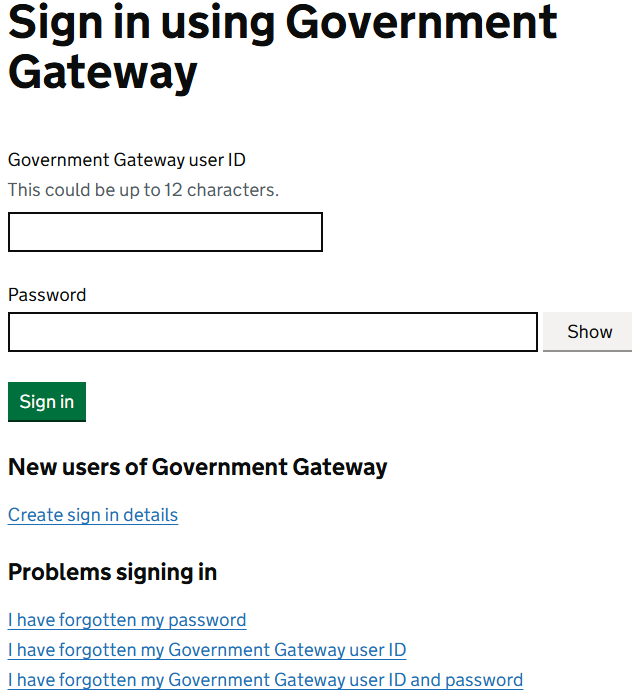
You can create sign in details as a new user if you need to or request assistance if you are already a user but have forgotten your sign in details.
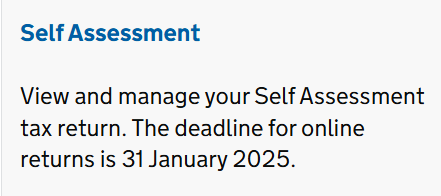
Once you have signed in through the Government Gateway (illustrated above), you will be taken to your own personal online account homepage, which, amongst many others, will include the following link:
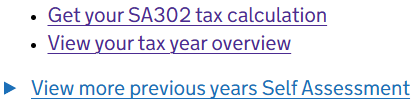
Once you have clicked on the “Self Assessment” link (illustrated above) within your personal account, you will be taken to your personal “Self Assessment” page, which, amongst many others, will include the following sub-headings and under them, amongst many others, links to your SA302 Tax Calculations and tax year overviews for the latest tax year you have filed for and for previous tax years you have filed for:
Please navigate the relevant links (illustrated above) to view, print and save the documents you need.
Please note that you will not be able to print your SA302 Tax Calculation from the HMRC website if you did not file your tax return through their website. Instead, consider the options below.
If you or your accountant use commercial software to file your returns
If you or your accountant use commercial software to do your return, you or your accountant, as applicable, will need to use that software to print your SA302 tax calculation. It might be called something different in the software - for example ‘tax computation’. You or your accountant should contact the company that makes the software if you or your accountant have trouble printing the tax calculation.
You will need to contact HMRC if you filed your return by post or if you have any problems getting the documents otherwise. Their telephone number is 0300 200 3610 or +4 161 930 8331 from outside the UK. Their opening times are 8am to 5pm Monday to Friday.
Conclusion
As a buy-to-let landlord, maintaining accurate and up-to-date tax records is essential for effective financial management and long-term success. The SA302 tax calculation and Annual Tax Overview are not only crucial documents in this regard, but also provide transparency and credibility in your financial dealings. Whether you are applying for a mortgage, refinancing a property or simply keeping your tax affairs in order, these documents play a vital role in evidencing your income and verifying that your tax obligations have been met.
FAQs
Q: How long does it take to receive the SA302 after submitting the tax return?
A: If you file your tax return online, the SA302 is available through your HMRC online account for printing 72 hours after you have sent the tax return. For paper submissions, it may take several weeks to receive the document by post.
Q: Can I use the SA302 from previous years for current mortgage applications?
A: Lenders typically require SA302 forms from the most recent tax years, usually the last two to three years, to assess your current financial situation.
Q: Is the Annual Tax Overview necessary if I have the SA302?
A: Yes, the Annual Tax Overview is often required alongside the SA302 to confirm that the tax calculated has been paid. Together, the two documents provide a complete picture of your tax affairs.
About the author
Pauzible Team
Editorial Team
The Pauzible Team consists of finance professionals and property market specialists dedicated to reinventing home ownership and BTL financing. With deep expertise across UK real estate and innovative financial products like Equity Partnership Agreements, we provide landlords and homeowners with the insights they need to unlock equity, navigate market volatility, and build sustainable wealth through property. Our mission is to make complex property finance simpler, quicker, and more accessible for everyone.
Ready to see what Pauzible could unlock?
Explore how accessing equity from your BTL property could support your business investment plans.
No obligation. Just a clear view of what might be possible.